My student (or myself) is unable to save or upload files to their home directory
This is usually discovered when a Notebook or R project auto-save fails (or is turned off), or you get an error akin to ‘No space left on device’.
We have a 10G storage quota for all users’ home directories. You can check your quota (or instruct the student(s)) by looking the usage-quota under the Services tab located on the Hub Control Panel (from the Jupyterlab interface: File --> Hub Control Panel --> Services --> usage-quota).
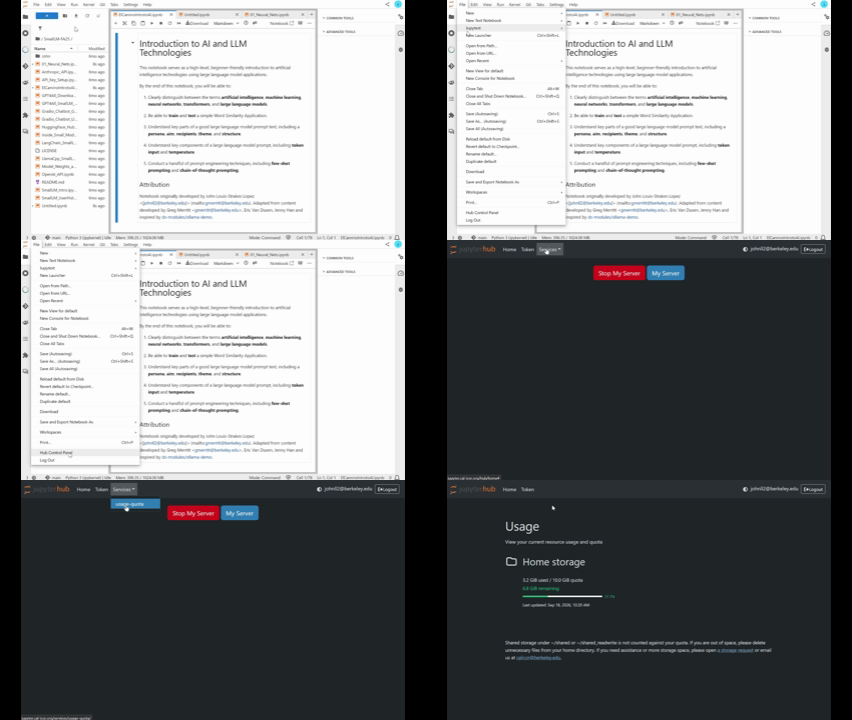
Alternatively, you can get to the Hub Control Panel directly by visiting the following URL: https://<your institution>.jupyter.cal-icor.org/hub/home
This usually occurs when the user does the following in their home directory:
Copies large files of datasets from the
shared/folderInstalls large python or R packages
Downloads or uploads large files from their laptop or general internet
Please delete any large folders and/or files to free up disk space. If you’re having issues deleting the files and require additional assistance, please open a GitHub Issue.
If you feel that you require a larger quota that 10G, open a GitHub Issue for your hub deployment.
Can I see my students servers?
Yes! You need to navigate to Admin section of the server. To request administrator access, please create a GitHub Issue for your hub deployment and we will get that deployed immediately.
Navigate to the Admin Section:
From a notebook: File > Hub Control Panel;
From a url:
[your_server].jupyter.cal-icor.org/hub/admin(e.g.csumb.jupyter.cal-icor.org/hub/admin)
Search for the User Name in Search box
Click Start Server (You may have to refresh the page)
Click Access Server
You will prompted to click an orange button asking for authorization to use your account to login in the user’s server.
Be careful! Best Practice is to then logout so you do not mistakenly start working in the student files.
R-Studio is giving a 403 error when it tries to save
This is most likely happening when a users has had over thirty minutes of inactivity; the system shuts the server down but user interface still looks like a session is active.
A student may close their laptop, move on for a time period, then open their laptop, see the R-Studio interface and start “working”. The work will not be saved and 403 errors will start to pop up in modal boxes as R Studio attempts to automatically save.
The user should refresh the browser tab every time they begin to work in R Studio if they have been away from the computer for more than 30 minutes.
Can I add packages for R or Python?
Yes. If you add the packages to your VM via pip install or the R package manager they will disappear between sessions.
If you would like the packages to be permanently available for all users on your hub, please fill out the Package Request GitHub issue. In most cases, we should be able to install the desired package(s).
If you have a lot of packages you need installed you can fill a normal GitHub Issue instead of package-by-package in the Package Request issue template.